


Aporte Liberación Del Famoso Lg Ls777 Zv9 Con Medusa E Imagenes Bien Explicado |
 |
|
Bienvenido, invitado ( Identificarse | Registrarse )
  |
Aporte Liberación Del Famoso Lg Ls777 Zv9 Con Medusa E Imagenes Bien Explicado |
 Aug 4 2018, 04:49 PM Aug 4 2018, 04:49 PM
Publicado:
#21
|
|
|
Miembro del Clan  Grupo: Expulsados Mensajes: 2 Agradecimientos: 0 Registrado: 17-June 14 Miembro No.: 612,088 Pais: 
 |
Alguien porfavor podría explicarme lo de las resistencias ya que tengo varios días intentando de muchas maneras y no logro que me conecte el teléfono hago los pinout bien y todo pero el teléfono la medusa no lo detecta
|
 |
 
|
| Anunciante Autorizado |
Aug 4 2018, 04:49 PM
Publicado:
#
|
 Estas ofertas pudieran interesarte. |
|
|
|
|
|
Aug 4 2018, 04:59 PM
Publicado:
#22
|
|
 Gran Maestro del Clan Grupo: Miembros Mensajes: 1,732 Agradecimientos: 1820 Registrado: 14-February 10 Desde: NICARAGUA Miembro No.: 85,158 Pais: 
|
ya probastes en setting- voltaje en el programa de z3x easy jtag plus cambia a 3.3v y ahi te conecta.
-------------------- ZONA CELULAR - SAN ISIDRO - MATAGALPA - NICARAGUA
TECHNICAL UNLOCKER SPECIALIST / HARDWARE-SOFTWARE... |
|
|
|
|
Aug 4 2018, 07:48 PM
Publicado:
#23
|
|
|
Miembro del Clan Grupo: Expulsados Mensajes: 2 Agradecimientos: 0 Registrado: 17-June 14 Miembro No.: 612,088 Pais:
|
Estoy usando medusa pro hermano
|
|
|
|
|
Aug 5 2018, 10:25 AM
Publicado:
#24
|
|
|
Gran Maestro del Clan Grupo: Miembros Mensajes: 1,732 Agradecimientos: 1820 Registrado: 14-February 10 Desde: NICARAGUA Miembro No.: 85,158 Pais:
|
CITA(MaicolOdalis @ Aug 4 2018, 06:48 PM)  Estoy usando medusa pro hermano en ese caso en el pinout sale que tienes que poner resistencia para que haya buena conexion. -------------------- ZONA CELULAR - SAN ISIDRO - MATAGALPA - NICARAGUA
TECHNICAL UNLOCKER SPECIALIST / HARDWARE-SOFTWARE... |
|
|
|
|
Aug 6 2018, 09:38 AM
Publicado:
#25
|
|
|
Miembro del Clan Grupo: Miembros Mensajes: 8 Agradecimientos: 0 Registrado: 13-October 17 Desde: USA Miembro No.: 994,852 Pais: 
|
pero las resistencias las pongo bien y no me da conexion nose por que
|
|
|
|
|
Aug 9 2018, 10:26 AM
Publicado:
#26
|
|
 Colaborador del Clan Grupo: Miembros Mensajes: 385 Agradecimientos: 382 Registrado: 10-June 12 Desde: Cardenas, Cuba Miembro No.: 349,535 Pais: 
|
Hola amigos del Clan. Tengo un problema con mi Medusa PRO He desbloqueado ya varios LS777 ZV9 en adelante pero. Los ultimos 3 que he tratado hacer no se me conectan de ninguna forma (uno murio en modo Qualcomm). Tambien el ultimo que hice me dice 32 gb en ajustes pero cuando lo conecto a la PC me detecta solo 9.18 GB! Que puede ser esto? Estoy por comprar una Z3X Easy Jtag plus. Espero me puedan ayudar. Saludos
|
|
|
|
|
Aug 9 2018, 10:37 AM
Publicado:
#27
|
|
|
Gran Maestro del Clan Grupo: Miembros Mensajes: 1,732 Agradecimientos: 1820 Registrado: 14-February 10 Desde: NICARAGUA Miembro No.: 85,158 Pais:
|
CITA(movilGSM @ Aug 9 2018, 09:26 AM) Hola amigos del Clan. Tengo un problema con mi Medusa PRO He desbloqueado ya varios LS777 ZV9 en adelante pero. Los ultimos 3 que he tratado hacer no se me conectan de ninguna forma (uno murio en modo Qualcomm). Tambien el ultimo que hice me dice 32 gb en ajustes pero cuando lo conecto a la PC me detecta solo 9.18 GB! Que puede ser esto? Estoy por comprar una Z3X Easy Jtag plus. Espero me puedan ayudar. Saludos yo tenia ese problema de conexion con medusa y con z3x easy jtag logre revivirlo. -------------------- ZONA CELULAR - SAN ISIDRO - MATAGALPA - NICARAGUA
TECHNICAL UNLOCKER SPECIALIST / HARDWARE-SOFTWARE... |
|
|
|
|
Aug 12 2018, 04:33 PM
Publicado:
#28
|
|
|
Miembro del Clan Grupo: Miembros Mensajes: 35 Agradecimientos: 32 Registrado: 21-July 18 Miembro No.: 1,059,158 Pais: 
|
CITA(reynaldotellez @ Jun 14 2018, 07:50 PM) Amigos aunque movilGSM lo posteo aqui https://www.clangsm.com/forum/index.php?showtopic=500609, el proceso es correcto, pero como bien dice al final de su pos el enrredo esta a la hora de elegir el modem y el carrier. Este proceso sirve para cualquier box que tenga soporte por EMMC para este modelo, e incluso medusapro como en mi caso creo que para los propietarios de medusa no serviria pues no posee jetap. Utilice el mismo moden y carrier que se utiliza para liberar el ls777 zv8. aunque estoy escribiendo antes de armar el movil para saber si se murio o se libero las imagenes servirian para otro clanero que pueda aportar algo mas. OJO, simplemente selecionar el moden y el carrie en la fila que dice file open, en la ultima imagen esta dentro de un cuadrito rojo, ese es el truco. Y que quede claro segui los pasos de movilGSM aunque es de cardenas y yo de Jaguey grande Saludos socio aunque no me conoscaz soy colega de luis Enrrique me dicen pepino. Saludos de Cuba Ayuda, por fa, como soldare el DATA 0 Se me hace muy incomodo apenas puedo ver lo? Alguna ideas? Estoy haciendo algunos ls777 ZV9 Mensaje modificado por 100%Succefull el Aug 12 2018, 04:34 PM |
|
|
|
|
Aug 12 2018, 07:48 PM
Publicado:
#29
|
|
 Miembro del Clan Grupo: Miembros Mensajes: 18 Agradecimientos: 42 Registrado: 1-February 10 Desde: Dominican Republic Miembro No.: 82,665 Pais:
|
En mi caso le trabajo con otoplus jtag pro con hardware medusa pro y no necesite las resistencias de 150ohm que indiaca este post, me conecta bien sin ellas.
CÓDIGO Model Settings:
Interface : eMMC Brand : LG Model : LS777 SRF : D:/OCTO-PRO-JTAG/LG_LS777_EMMC.srf Voltage : 1.8V Bus Mode : 1 bit Bus speed : Auto Connecting... Device : Samsung eMMC QE13MB Page size : 512 B Block size : 512 B Block count : 30535680 Size : 14.56 GB (14910.00 MB) --------------------------------------------------------------- CID Info CID : 150100514531334D420DF9BC9BF9146D Manufacturer ID : 0X15 Device/BGA : BGA (Discrete embedded) OEM/Application ID : 0X00 Product name : QE13MB Product revision : 0.13 Product serial number : (hex) F9BC9BF9 Manufacturing date : 01/2017 --------------------------------------------------------------- CSD Info CSD : D02701320F5903FFF6DBFFEF8E40400D CSD structure : CSD version No. 1.2 SPEC version : 4.1, 4.2, 4.3, 4.4, 4.41, 4.5, 4.51, 5.0, 5.01, 5.1 Data read access time1: 15 ms TRAN speed : 26 MHz READ block length : 512 Bytes WP group enable : YES PERM_WRITE_PROTECT : NO TMP_WRITE_PROTECT : NO --------------------------------------------------------------- EXTCSD Info Revision 1.8 (for MMC v5.1) Erase block size : 512 Kbytes Boot1 size : 4096 Kbytes Boot2 size : 4096 Kbytes RPMB size : 4096 Kbytes Partition config : (0x00) 00000000 Boot partition enable : Device not boot enabled (default) (Bus width = 1Bit) Boot ACK : No boot acknowledge sent (default) Boot bus conditions : (0x00) 00000000 Boot bus width : x1 (sdr) or x4 (ddr) bus width in boot operation mode (default) Reset boot bus conditions : Reset bus width to x1, single data rate and backward compatible timings after boot operation (default) Boot mode : Use single data rate + backward compatible timings in boot operation (default) RST_n function : (0x01) RST_n signal is permanently enabled Partitioning support : Device supports partitioning features Enhanced attribute : Device can have enhanced technological features in partitions and user data area. Max enhanced data size: 7626752 Kbytes Partitions attribute : 0x0 Part setting completed: 0x0 GP partition 1 size : 0 b GP partition 2 size : 0 b GP partition 3 size : 0 b GP partition 4 size : 0 b Enhanced area size : (0x0) 0 b Enhanced area start : (0x0) 0 b Backup EXT_CSD saved to file C:/Program Files (x86)/Octoplus Pro JTAG Software/EXT_CSD Backups/QE13MB_12_08_2018_17_09_01.bin. Connect successful. --------------------------------------------------------------- SW: 1.6.5; FW: 1.24. P00: GPT (00000000, 00004000) 8 MB P01: modem (00004000, 0002C000) 88 MB P02: aboot (00030000, 00001000) 2048 KB P03: abootbak (00031000, 00001000) 2048 KB P04: tz (00032000, 00001000) 2048 KB P05: tzbak (00033000, 00001000) 2048 KB P06: sbl1 (00034000, 00000800) 1024 KB P07: sbl1bak (00034800, 00000800) 1024 KB P08: rpm (00035000, 00000400) 512 KB P09: rpmbak (00035400, 00000400) 512 KB P10: devcfg (00035800, 00000400) 512 KB P11: devcfgbak (00035C00, 00000400) 512 KB P12: cmnlib (00036000, 00000400) 512 KB P13: cmnlibbak (00036400, 00000400) 512 KB P14: cmnlib64 (00036800, 00000400) 512 KB P15: cmnlib64bak (00036C00, 00000400) 512 KB P16: keymaster (00037000, 00000400) 512 KB P17: keymasterbak (00037400, 00000400) 512 KB P18: spare1 (00037800, 00000400) 512 KB P19: spare2 (00037C00, 00000400) 512 KB P20: persistent (00038000, 00000400) 512 KB P21: devinfo (00038400, 00000800) 1024 KB P22: spare3 (00038C00, 00003400) 6.5 MB P23: modemst1 (0003C000, 00000C00) 1536 KB P24: modemst2 (0003CC00, 00000C00) 1536 KB P25: mcfg (0003D800, 00002000) 4 MB P26: fsc (0003F800, 00000400) 512 KB P27: ssd (0003FC00, 00000400) 512 KB P28: fsg (00040000, 00000C00) 1536 KB P29: spare4 (00040C00, 00003400) 6.5 MB P30: dsp (00044000, 00008000) 16 MB P31: ftm (0004C000, 00004000) 8 MB P32: misc (00050000, 00004000) 8 MB P33: drm (00054000, 00004000) 8 MB P34: sns (00058000, 00004000) 8 MB P35: fota (0005C000, 00005000) 10 MB P36: sec (00061000, 00000400) 512 KB P37: keystore (00061400, 00000400) 512 KB P38: rct (00061800, 00000400) 512 KB P39: encrypt (00061C00, 00000400) 512 KB P40: eksst (00062000, 00000400) 512 KB P41: apdp (00062400, 00000400) 512 KB P42: msadp (00062800, 00000400) 512 KB P43: dpo (00062C00, 00000400) 512 KB P44: DDR (00063000, 00000400) 512 KB P45: spare5 (00063400, 00000C00) 1536 KB P46: boot (00064000, 00010000) 32 MB P47: laf (00074000, 00010000) 32 MB P48: lafbak (00084000, 00010000) 32 MB P49: recovery (00094000, 00010000) 32 MB P50: recoverybak (000A4000, 00010000) 32 MB P51: factory (000B4000, 0001C000) 56 MB P52: raw_resources (000D0000, 00002000) 4 MB P53: raw_resourcesbak (000D2000, 00002000) 4 MB P54: persist (000D4000, 00010000) 32 MB P55: mpt (000E4000, 00004000) 8 MB P56: carrier (000E8000, 00014000) 40 MB P57: system (000FC000, 00740000) 3712 MB P58: cache (0083C000, 00268000) 1232 MB P59: userdata (00AA4000, 0127AFDE) 9.24 GB P60: grow (01D1EFDE, 00000001) 512 b Partition table has been found on device. Don't forget to reconnect the device after writing to see changes. Writting partitions. Please wait... Writing partition modem from D:/LG/LS777/modem file... Done. Writing partition carrier from D:/LG/LS777/carrier file... Done. Writing is finished. SW: 1.6.5; FW: 1.24. Reconnect the device to see changesDisconnected. -------------------- MIS HERRAMIENTAS:
OCTOPLUS-->SAM+LG+JTAG PRO+MEDUSA PRO HARDWARE FURIOUS GOLD-->PACK 1-2-3-4-5-6 SIGMA-->PACK 1-2-3 ATF NITRO+JTAG SETOOL/LGTOOL Z3X-->SAM+LG NCK PRO+UMT XTC2CLIP GCPRO UAT VARIAS MAS SIN SOPORTE ACTUAL Y ALGUNAS BASADAS EN CREDITOS COMO SAMKEY..... Codebunlocks |
|
|
|
A continuacion 3 usuario(s) le Agradece(n) a F10ch3 por su Colaboracion: alancomunicaciones, lealhtc, reynaldotellez | |
|
Aug 13 2018, 05:13 PM
Publicado:
#30
|
|
|
Miembro del Clan Grupo: Miembros Mensajes: 35 Agradecimientos: 32 Registrado: 21-July 18 Miembro No.: 1,059,158 Pais:
|
Me pueden ayudar con el pineout Por favor, no logro soldar el DATA 0 se me hace complicado. Me pueden recomendar alguna herramienta con la que lo hicieron o algunas idea
|
|
|
|
A continuacion 1 usuario(s) le Agradece(n) a 100%Succefull por su Colaboracion: thejosue01 | |
|
Aug 13 2018, 09:04 PM
Publicado:
#31
|
|
|
Miembro del Clan Grupo: Miembros Mensajes: 18 Agradecimientos: 42 Registrado: 1-February 10 Desde: Dominican Republic Miembro No.: 82,665 Pais:
|
CITA(100%Succefull @ Aug 13 2018, 05:13 PM) Me pueden ayudar con el pineout Por favor, no logro soldar el DATA 0 se me hace complicado. Me pueden recomendar alguna herramienta con la que lo hicieron o algunas idea Yo en lo personal use una de las agujas que trae octoplus para jtag, de las que se unde la punta sostenida por un brazo flexible para evitar soldar en ese punto ya que es complicado. Incluso estoy preparando una pcb workstation casera para no tener que soldar.. Algo como esto pero con brazos mucho mas delgados... 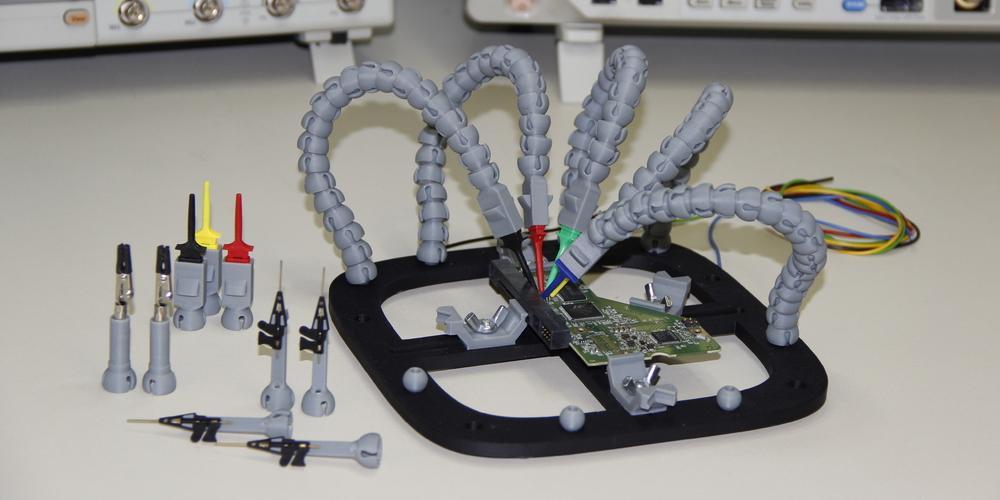
-------------------- MIS HERRAMIENTAS:
OCTOPLUS-->SAM+LG+JTAG PRO+MEDUSA PRO HARDWARE FURIOUS GOLD-->PACK 1-2-3-4-5-6 SIGMA-->PACK 1-2-3 ATF NITRO+JTAG SETOOL/LGTOOL Z3X-->SAM+LG NCK PRO+UMT XTC2CLIP GCPRO UAT VARIAS MAS SIN SOPORTE ACTUAL Y ALGUNAS BASADAS EN CREDITOS COMO SAMKEY..... Codebunlocks |
|
|
|
A continuacion 9 usuario(s) le Agradece(n) a CodebUnlocks por su Colaboracion: 100%Succefull, chinitocuba, claco78, Daymel, fridel, jhonnjhorman, makely, nico16032, portalgsm | |
|
Aug 18 2018, 11:36 AM
Publicado:
#32
|
|
|
Miembro del Clan Grupo: Miembros Mensajes: 35 Agradecimientos: 32 Registrado: 21-July 18 Miembro No.: 1,059,158 Pais:
|
CITA(F10ch3 @ Aug 12 2018, 08:48 PM) En mi caso le trabajo con otoplus jtag pro con hardware medusa pro y no necesite las resistencias de 150ohm que indiaca este post, me conecta bien sin ellas. CÓDIGO Model Settings: Interface : eMMC Brand : LG Model : LS777 SRF : D:/OCTO-PRO-JTAG/LG_LS777_EMMC.srf Voltage : 1.8V Bus Mode : 1 bit Bus speed : Auto Connecting... Device : Samsung eMMC QE13MB Page size : 512 B Block size : 512 B Block count : 30535680 Size : 14.56 GB (14910.00 MB) --------------------------------------------------------------- CID Info CID : 150100514531334D420DF9BC9BF9146D Manufacturer ID : 0X15 Device/BGA : BGA (Discrete embedded) OEM/Application ID : 0X00 Product name : QE13MB Product revision : 0.13 Product serial number : (hex) F9BC9BF9 Manufacturing date : 01/2017 --------------------------------------------------------------- CSD Info CSD : D02701320F5903FFF6DBFFEF8E40400D CSD structure : CSD version No. 1.2 SPEC version : 4.1, 4.2, 4.3, 4.4, 4.41, 4.5, 4.51, 5.0, 5.01, 5.1 Data read access time1: 15 ms TRAN speed : 26 MHz READ block length : 512 Bytes WP group enable : YES PERM_WRITE_PROTECT : NO TMP_WRITE_PROTECT : NO --------------------------------------------------------------- EXTCSD Info Revision 1.8 (for MMC v5.1) Erase block size : 512 Kbytes Boot1 size : 4096 Kbytes Boot2 size : 4096 Kbytes RPMB size : 4096 Kbytes Partition config : (0x00) 00000000 Boot partition enable : Device not boot enabled (default) (Bus width = 1Bit) Boot ACK : No boot acknowledge sent (default) Boot bus conditions : (0x00) 00000000 Boot bus width : x1 (sdr) or x4 (ddr) bus width in boot operation mode (default) Reset boot bus conditions : Reset bus width to x1, single data rate and backward compatible timings after boot operation (default) Boot mode : Use single data rate + backward compatible timings in boot operation (default) RST_n function : (0x01) RST_n signal is permanently enabled Partitioning support : Device supports partitioning features Enhanced attribute : Device can have enhanced technological features in partitions and user data area. Max enhanced data size: 7626752 Kbytes Partitions attribute : 0x0 Part setting completed: 0x0 GP partition 1 size : 0 b GP partition 2 size : 0 b GP partition 3 size : 0 b GP partition 4 size : 0 b Enhanced area size : (0x0) 0 b Enhanced area start : (0x0) 0 b Backup EXT_CSD saved to file C:/Program Files (x86)/Octoplus Pro JTAG Software/EXT_CSD Backups/QE13MB_12_08_2018_17_09_01.bin. Connect successful. --------------------------------------------------------------- SW: 1.6.5; FW: 1.24. P00: GPT (00000000, 00004000) 8 MB P01: modem (00004000, 0002C000) 88 MB P02: aboot (00030000, 00001000) 2048 KB P03: abootbak (00031000, 00001000) 2048 KB P04: tz (00032000, 00001000) 2048 KB P05: tzbak (00033000, 00001000) 2048 KB P06: sbl1 (00034000, 00000800) 1024 KB P07: sbl1bak (00034800, 00000800) 1024 KB P08: rpm (00035000, 00000400) 512 KB P09: rpmbak (00035400, 00000400) 512 KB P10: devcfg (00035800, 00000400) 512 KB P11: devcfgbak (00035C00, 00000400) 512 KB P12: cmnlib (00036000, 00000400) 512 KB P13: cmnlibbak (00036400, 00000400) 512 KB P14: cmnlib64 (00036800, 00000400) 512 KB P15: cmnlib64bak (00036C00, 00000400) 512 KB P16: keymaster (00037000, 00000400) 512 KB P17: keymasterbak (00037400, 00000400) 512 KB P18: spare1 (00037800, 00000400) 512 KB P19: spare2 (00037C00, 00000400) 512 KB P20: persistent (00038000, 00000400) 512 KB P21: devinfo (00038400, 00000800) 1024 KB P22: spare3 (00038C00, 00003400) 6.5 MB P23: modemst1 (0003C000, 00000C00) 1536 KB P24: modemst2 (0003CC00, 00000C00) 1536 KB P25: mcfg (0003D800, 00002000) 4 MB P26: fsc (0003F800, 00000400) 512 KB P27: ssd (0003FC00, 00000400) 512 KB P28: fsg (00040000, 00000C00) 1536 KB P29: spare4 (00040C00, 00003400) 6.5 MB P30: dsp (00044000, 00008000) 16 MB P31: ftm (0004C000, 00004000) 8 MB P32: misc (00050000, 00004000) 8 MB P33: drm (00054000, 00004000) 8 MB P34: sns (00058000, 00004000) 8 MB P35: fota (0005C000, 00005000) 10 MB P36: sec (00061000, 00000400) 512 KB P37: keystore (00061400, 00000400) 512 KB P38: rct (00061800, 00000400) 512 KB P39: encrypt (00061C00, 00000400) 512 KB P40: eksst (00062000, 00000400) 512 KB P41: apdp (00062400, 00000400) 512 KB P42: msadp (00062800, 00000400) 512 KB P43: dpo (00062C00, 00000400) 512 KB P44: DDR (00063000, 00000400) 512 KB P45: spare5 (00063400, 00000C00) 1536 KB P46: boot (00064000, 00010000) 32 MB P47: laf (00074000, 00010000) 32 MB P48: lafbak (00084000, 00010000) 32 MB P49: recovery (00094000, 00010000) 32 MB P50: recoverybak (000A4000, 00010000) 32 MB P51: factory (000B4000, 0001C000) 56 MB P52: raw_resources (000D0000, 00002000) 4 MB P53: raw_resourcesbak (000D2000, 00002000) 4 MB P54: persist (000D4000, 00010000) 32 MB P55: mpt (000E4000, 00004000) 8 MB P56: carrier (000E8000, 00014000) 40 MB P57: system (000FC000, 00740000) 3712 MB P58: cache (0083C000, 00268000) 1232 MB P59: userdata (00AA4000, 0127AFDE) 9.24 GB P60: grow (01D1EFDE, 00000001) 512 b Partition table has been found on device. Don't forget to reconnect the device after writing to see changes. Writting partitions. Please wait... Writing partition modem from D:/LG/LS777/modem file... Done. Writing partition carrier from D:/LG/LS777/carrier file... Done. Writing is finished. SW: 1.6.5; FW: 1.24. Reconnect the device to see changesDisconnected. Puedes enviar alguna foto de la pcb casera. Solo pude conectar 7 y los demás no me conectan no se por que? |
|
|
|
 Aug 23 2018, 01:51 PM Aug 23 2018, 01:51 PM
Publicado:
#33
|
|
 Colaborador del Clan Grupo: Miembros Mensajes: 351 Agradecimientos: 212 Registrado: 23-December 08 Desde: Usa Miembro No.: 15,162 Pais:
|
CITA(F10ch3 @ Aug 12 2018, 08:48 PM) En mi caso le trabajo con otoplus jtag pro con hardware medusa pro y no necesite las resistencias de 150ohm que indiaca este post, me conecta bien sin ellas. CÓDIGO Model Settings: Interface : eMMC Brand : LG Model : LS777 SRF : D:/OCTO-PRO-JTAG/LG_LS777_EMMC.srf Voltage : 1.8V Bus Mode : 1 bit Bus speed : Auto Connecting... Device : Samsung eMMC QE13MB Page size : 512 B Block size : 512 B Block count : 30535680 Size : 14.56 GB (14910.00 MB) --------------------------------------------------------------- CID Info CID : 150100514531334D420DF9BC9BF9146D Manufacturer ID : 0X15 Device/BGA : BGA (Discrete embedded) OEM/Application ID : 0X00 Product name : QE13MB Product revision : 0.13 Product serial number : (hex) F9BC9BF9 Manufacturing date : 01/2017 --------------------------------------------------------------- CSD Info CSD : D02701320F5903FFF6DBFFEF8E40400D CSD structure : CSD version No. 1.2 SPEC version : 4.1, 4.2, 4.3, 4.4, 4.41, 4.5, 4.51, 5.0, 5.01, 5.1 Data read access time1: 15 ms TRAN speed : 26 MHz READ block length : 512 Bytes WP group enable : YES PERM_WRITE_PROTECT : NO TMP_WRITE_PROTECT : NO --------------------------------------------------------------- EXTCSD Info Revision 1.8 (for MMC v5.1) Erase block size : 512 Kbytes Boot1 size : 4096 Kbytes Boot2 size : 4096 Kbytes RPMB size : 4096 Kbytes Partition config : (0x00) 00000000 Boot partition enable : Device not boot enabled (default) (Bus width = 1Bit) Boot ACK : No boot acknowledge sent (default) Boot bus conditions : (0x00) 00000000 Boot bus width : x1 (sdr) or x4 (ddr) bus width in boot operation mode (default) Reset boot bus conditions : Reset bus width to x1, single data rate and backward compatible timings after boot operation (default) Boot mode : Use single data rate + backward compatible timings in boot operation (default) RST_n function : (0x01) RST_n signal is permanently enabled Partitioning support : Device supports partitioning features Enhanced attribute : Device can have enhanced technological features in partitions and user data area. Max enhanced data size: 7626752 Kbytes Partitions attribute : 0x0 Part setting completed: 0x0 GP partition 1 size : 0 b GP partition 2 size : 0 b GP partition 3 size : 0 b GP partition 4 size : 0 b Enhanced area size : (0x0) 0 b Enhanced area start : (0x0) 0 b Backup EXT_CSD saved to file C:/Program Files (x86)/Octoplus Pro JTAG Software/EXT_CSD Backups/QE13MB_12_08_2018_17_09_01.bin. Connect successful. --------------------------------------------------------------- SW: 1.6.5; FW: 1.24. P00: GPT (00000000, 00004000) 8 MB P01: modem (00004000, 0002C000) 88 MB P02: aboot (00030000, 00001000) 2048 KB P03: abootbak (00031000, 00001000) 2048 KB P04: tz (00032000, 00001000) 2048 KB P05: tzbak (00033000, 00001000) 2048 KB P06: sbl1 (00034000, 00000800) 1024 KB P07: sbl1bak (00034800, 00000800) 1024 KB P08: rpm (00035000, 00000400) 512 KB P09: rpmbak (00035400, 00000400) 512 KB P10: devcfg (00035800, 00000400) 512 KB P11: devcfgbak (00035C00, 00000400) 512 KB P12: cmnlib (00036000, 00000400) 512 KB P13: cmnlibbak (00036400, 00000400) 512 KB P14: cmnlib64 (00036800, 00000400) 512 KB P15: cmnlib64bak (00036C00, 00000400) 512 KB P16: keymaster (00037000, 00000400) 512 KB P17: keymasterbak (00037400, 00000400) 512 KB P18: spare1 (00037800, 00000400) 512 KB P19: spare2 (00037C00, 00000400) 512 KB P20: persistent (00038000, 00000400) 512 KB P21: devinfo (00038400, 00000800) 1024 KB P22: spare3 (00038C00, 00003400) 6.5 MB P23: modemst1 (0003C000, 00000C00) 1536 KB P24: modemst2 (0003CC00, 00000C00) 1536 KB P25: mcfg (0003D800, 00002000) 4 MB P26: fsc (0003F800, 00000400) 512 KB P27: ssd (0003FC00, 00000400) 512 KB P28: fsg (00040000, 00000C00) 1536 KB P29: spare4 (00040C00, 00003400) 6.5 MB P30: dsp (00044000, 00008000) 16 MB P31: ftm (0004C000, 00004000) 8 MB P32: misc (00050000, 00004000) 8 MB P33: drm (00054000, 00004000) 8 MB P34: sns (00058000, 00004000) 8 MB P35: fota (0005C000, 00005000) 10 MB P36: sec (00061000, 00000400) 512 KB P37: keystore (00061400, 00000400) 512 KB P38: rct (00061800, 00000400) 512 KB P39: encrypt (00061C00, 00000400) 512 KB P40: eksst (00062000, 00000400) 512 KB P41: apdp (00062400, 00000400) 512 KB P42: msadp (00062800, 00000400) 512 KB P43: dpo (00062C00, 00000400) 512 KB P44: DDR (00063000, 00000400) 512 KB P45: spare5 (00063400, 00000C00) 1536 KB P46: boot (00064000, 00010000) 32 MB P47: laf (00074000, 00010000) 32 MB P48: lafbak (00084000, 00010000) 32 MB P49: recovery (00094000, 00010000) 32 MB P50: recoverybak (000A4000, 00010000) 32 MB P51: factory (000B4000, 0001C000) 56 MB P52: raw_resources (000D0000, 00002000) 4 MB P53: raw_resourcesbak (000D2000, 00002000) 4 MB P54: persist (000D4000, 00010000) 32 MB P55: mpt (000E4000, 00004000) 8 MB P56: carrier (000E8000, 00014000) 40 MB P57: system (000FC000, 00740000) 3712 MB P58: cache (0083C000, 00268000) 1232 MB P59: userdata (00AA4000, 0127AFDE) 9.24 GB P60: grow (01D1EFDE, 00000001) 512 b Partition table has been found on device. Don't forget to reconnect the device after writing to see changes. Writting partitions. Please wait... Writing partition modem from D:/LG/LS777/modem file... Done. Writing partition carrier from D:/LG/LS777/carrier file... Done. Writing is finished. SW: 1.6.5; FW: 1.24. Reconnect the device to see changesDisconnected. Amigos, tengan presente que el resistor para algunas versiones del soft no los afectará, pero para otros como el LS67x, si los afectara si las quitan y van hacer la liberacion los dejara en brick al momento de desconectalor y solo la pc lo reconocera en el famozo qcomloader 9009 y para sacarlos de ahi es una lucha grande. E incluso a mi en algunos csos para conectarlo si no quitos las resistencia no me deja conectar. Saludos de Cuba |
|
|
|
A continuacion 2 usuario(s) le Agradece(n) a reynaldotellez por su Colaboracion: CodebUnlocks, superthesk | |
|
Aug 23 2018, 03:15 PM
Publicado:
#34
|
|
|
Colaborador del Clan Grupo: Miembros Mensajes: 351 Agradecimientos: 212 Registrado: 23-December 08 Desde: Usa Miembro No.: 15,162 Pais:
|
CITA(movilGSM @ Aug 9 2018, 11:26 AM) Hola amigos del Clan. Tengo un problema con mi Medusa PRO He desbloqueado ya varios LS777 ZV9 en adelante pero. Los ultimos 3 que he tratado hacer no se me conectan de ninguna forma (uno murio en modo Qualcomm). Tambien el ultimo que hice me dice 32 gb en ajustes pero cuando lo conecto a la PC me detecta solo 9.18 GB! Que puede ser esto? Estoy por comprar una Z3X Easy Jtag plus. Espero me puedan ayudar. Saludos Socio, mira cuando no te conecta con medusa pro usa el octopluspro que es casi lo mismo, pero a mi me a pasado eso y cuando cambio de uno para otro me pincha ok, ahora aclarar tengo medusa pro activada con samsung y lg de octoplus eso me permite utilizar el octoplus jetap pro, no se en tu caso. En cuanto a la muerte del ese lg a mi me paso lo mismo pero estoy a unos dias de adquirir eazy jetap para probar repararlo, eso pasa amigo cuando unas o las dos resistensias se desoldan a la hora de hacer la coneccion o que las desconecten como en mi caso no se conectaba y las deconecte hice el proceso full y quedo en modo qcom 9009 u algo asi, la primerqa vez lo saque con infinitydongle modulo lg, me permitio aunque no lo puso en la pantalla del movil entrar n modo donloader y por esa via lo lebante.En el caso de la memoria simplemente hasle hard reset al movil y quedara con la memoria de fabrica tanto en el soft o cuando lo conectes a la PC. comenta si algo te asitio socio. Saludos de Cuba |
|
|
|
A continuacion 1 usuario(s) le Agradece(n) a reynaldotellez por su Colaboracion: uriel111 | |
|
Aug 24 2018, 09:56 PM
Publicado:
#35
|
|
|
Miembro del Clan Grupo: Miembros Mensajes: 35 Agradecimientos: 32 Registrado: 21-July 18 Miembro No.: 1,059,158 Pais:
|
Welcome to Medusa Pro Software version 1.6.5.
Started. Reader #0: Generic USB Smart Card Reader 0 Please disconnect battery and USB cable. Model Settings: Interface : eMMC Brand : LG Model : LS777 SRF : C:/Program Files (x86)/Medusa Pro Software/firmwareFolder/LG_LS777_EMMC.srf Voltage : 1.8V Bus Mode : 1 bit Bus speed : Auto Connecting... Device : Unknown eMMC M MOR Page size : 512 B Block size : 512 B Block count : 3848192 Size : 1879.00 MB --------------------------------------------------------------- CID Info CID : 65646F4D204D4F520240020012C00041 Manufacturer ID : 0X65 Device/BGA : Device (removable) OEM/Application ID : 0X6F Product name : M MOR Product revision : 4.0 Product serial number : (hex) 20012C0 Manufacturing date : 00/2013 --------------------------------------------------------------- CSD Info CSD : D07FFF320F59007FF6DB80001E40001D CSD structure : CSD version No. 1.2 SPEC version : 4.1, 4.2, 4.3, 4.4, 4.41, 4.5, 4.51, 5.0, 5.01, 5.1 Data read access time1: 80 ms TRAN speed : 26 MHz READ block length : 512 Bytes WP group enable : NO PERM_WRITE_PROTECT : NO TMP_WRITE_PROTECT : NO --------------------------------------------------------------- EXTCSD Info Revision 1.5 (for MMC v4.41) Erase block size : 512 Kbytes Boot1 size : 2048 Kbytes Boot2 size : 2048 Kbytes RPMB size : 128 Kbytes Partition config : (0x78) 01111000 Boot partition enable : User area (Bus width = 1Bit) Boot ACK : Boot acknowledge sent during boot operation Bit Boot bus conditions : (0x00) 00000000 Boot bus width : x1 (sdr) or x4 (ddr) bus width in boot operation mode (default) Reset boot bus conditions : Reset bus width to x1, single data rate and backward compatible timings after boot operation (default) Boot mode : Use single data rate + backward compatible timings in boot operation (default) RST_n function : (0x00) RST_n signal is temporary disabled (default) Partitioning support : Device supports partitioning features Enhanced attribute : Device can have enhanced technological features in partitions and user data area. Max enhanced data size: 131072 Kbytes Partitions attribute : 0x0 Part setting completed: 0x0 GP partition 1 size : 0 b GP partition 2 size : 0 b GP partition 3 size : 0 b GP partition 4 size : 0 b Enhanced area size : (0x0) 0 b Enhanced area start : (0x0) 0 b ---------------------------------------------------------------Searching Android build info... Not found --------------------------------------------------------------- Backup EXT_CSD saved to file C:/Program Files (x86)/Medusa Pro Software/EXT_CSD Backups/M MOR_24_08_2018_22_41_16.bin. Connect successful. --------------------------------------------------------------- SW: 1.6.5; FW: 1.24. Partition table was not found. Please select file. Pinout configuration not detected Disconnected. Please disconnect battery and USB cable. Model Settings: Interface : eMMC Brand : LG Model : LS777 SRF : C:/Program Files (x86)/Medusa Pro Software/firmwareFolder/LG_LS777_EMMC.srf Voltage : 1.8V Bus Mode : 1 bit Bus speed : Auto Connecting... Device : Unknown eMMC M MOR Page size : 512 B Block size : 512 B Block count : 3848192 Size : 1879.00 MB --------------------------------------------------------------- CID Info CID : 65646F4D204D4F520240020012C00041 Manufacturer ID : 0X65 Device/BGA : Device (removable) OEM/Application ID : 0X6F Product name : M MOR Product revision : 4.0 Product serial number : (hex) 20012C0 Manufacturing date : 00/2013 --------------------------------------------------------------- CSD Info CSD : D07FFF320F59007FF6DB80001E40001D CSD structure : CSD version No. 1.2 SPEC version : 4.1, 4.2, 4.3, 4.4, 4.41, 4.5, 4.51, 5.0, 5.01, 5.1 Data read access time1: 80 ms TRAN speed : 26 MHz READ block length : 512 Bytes WP group enable : NO PERM_WRITE_PROTECT : NO TMP_WRITE_PROTECT : NO --------------------------------------------------------------- EXTCSD Info Revision 1.5 (for MMC v4.41) Erase block size : 512 Kbytes Boot1 size : 2048 Kbytes Boot2 size : 2048 Kbytes RPMB size : 128 Kbytes Partition config : (0x78) 01111000 Boot partition enable : User area (Bus width = 1Bit) Boot ACK : Boot acknowledge sent during boot operation Bit Boot bus conditions : (0x00) 00000000 Boot bus width : x1 (sdr) or x4 (ddr) bus width in boot operation mode (default) Reset boot bus conditions : Reset bus width to x1, single data rate and backward compatible timings after boot operation (default) Boot mode : Use single data rate + backward compatible timings in boot operation (default) RST_n function : (0x00) RST_n signal is temporary disabled (default) Partitioning support : Device supports partitioning features Enhanced attribute : Device can have enhanced technological features in partitions and user data area. Max enhanced data size: 131072 Kbytes Partitions attribute : 0x0 Part setting completed: 0x0 GP partition 1 size : 0 b GP partition 2 size : 0 b GP partition 3 size : 0 b GP partition 4 size : 0 b Enhanced area size : (0x0) 0 b Enhanced area start : (0x0) 0 b ---------------------------------------------------------------Searching Android build info... Not found --------------------------------------------------------------- Backup EXT_CSD saved to file C:/Program Files (x86)/Medusa Pro Software/EXT_CSD Backups/M MOR_24_08_2018_22_43_48.bin. Connect successful. --------------------------------------------------------------- SW: 1.6.5; FW: 1.24. Quiero buscar la forma de hacer esto mas rapido algunas ideas??????? Por fa |
|
|
|
 Aug 25 2018, 12:21 PM Aug 25 2018, 12:21 PM
Publicado:
#36
|
|
|
Miembro del Clan Grupo: Miembros Mensajes: 43 Agradecimientos: 48 Registrado: 8-June 15 Miembro No.: 725,038 Pais:
|
Model Settings:
Interface : eMMC Brand : LG Model : LS777 SRF : C:/Program Files (x86)/Medusa Pro Software/firmwareFolder/LG_LS777_EMMC.srf Voltage : 1.8V Bus Mode : 1 bit Bus speed : Auto Connecting... ERROR[001]: Can not connect. No target device present. no he podido |
|
|
|
|
Aug 26 2018, 07:34 AM
Publicado:
#37
|
|
|
Miembro del Clan Grupo: Miembros Mensajes: 35 Agradecimientos: 32 Registrado: 21-July 18 Miembro No.: 1,059,158 Pais:
|
CITA(Alber08 @ Aug 25 2018, 01:21 PM) Model Settings: Interface : eMMC Brand : LG Model : LS777 SRF : C:/Program Files (x86)/Medusa Pro Software/firmwareFolder/LG_LS777_EMMC.srf Voltage : 1.8V Bus Mode : 1 bit Bus speed : Auto Connecting... ERROR[001]: Can not connect. No target device present. no he podido Envia una foto de como esta soldando los puntos. Tengo la solucion para ti Compartela aqui en el FORO La foto con alta calidad para ver bien los puntos, si es posible usa una LUPA para tomar la foto SI, alguien localiza el DIAGRAMA ESQUEMATICO PODEMOS SIMPLIFICAR LOS PUNTOS DE SOLDADURA. |
|
|
|
|
Aug 31 2018, 10:58 AM
Publicado:
#38
|
|
|
Miembro del Clan Grupo: Miembros Mensajes: 8 Agradecimientos: 0 Registrado: 12-September 17 Desde: USA Miembro No.: 986,439 Pais:
|
hice el mismo procedimiento y ahora no enciende.
|
|
|
|
|
Sep 1 2018, 01:35 AM
Publicado:
#39
|
|
|
Miembro del Clan Grupo: Miembros Mensajes: 35 Agradecimientos: 32 Registrado: 21-July 18 Miembro No.: 1,059,158 Pais:
|
CITA(compumax2017 @ Aug 31 2018, 11:58 AM) hice el mismo procedimiento y ahora no enciende. Debe verificar los puntos que soldaste con un microscopio o una lupa de buena calidad. VERIFICA SI HAY ALGUN COMPONENTE Averiado. busca un LG LS777 Que prenda y mide los componente que debes soldar los puntos a ver cual es su medida. y a si puedes reponer esos componentes, ya sean resistencia o capacitor u otros |
|
|
|
|
Sep 3 2018, 12:37 AM
Publicado:
#40
|
|
 Gran Maestro del Clan Grupo: Miembros Mensajes: 1,974 Agradecimientos: 2552 Registrado: 14-April 11 Desde: Mexico City Miembro No.: 201,337 Pais: 
|
Tendrá solución el ZVA?
-------------------- |
|
|
|
|
|
|
Fecha y Hora actual: 7th July 2026 - 02:48 PM |




